Overview
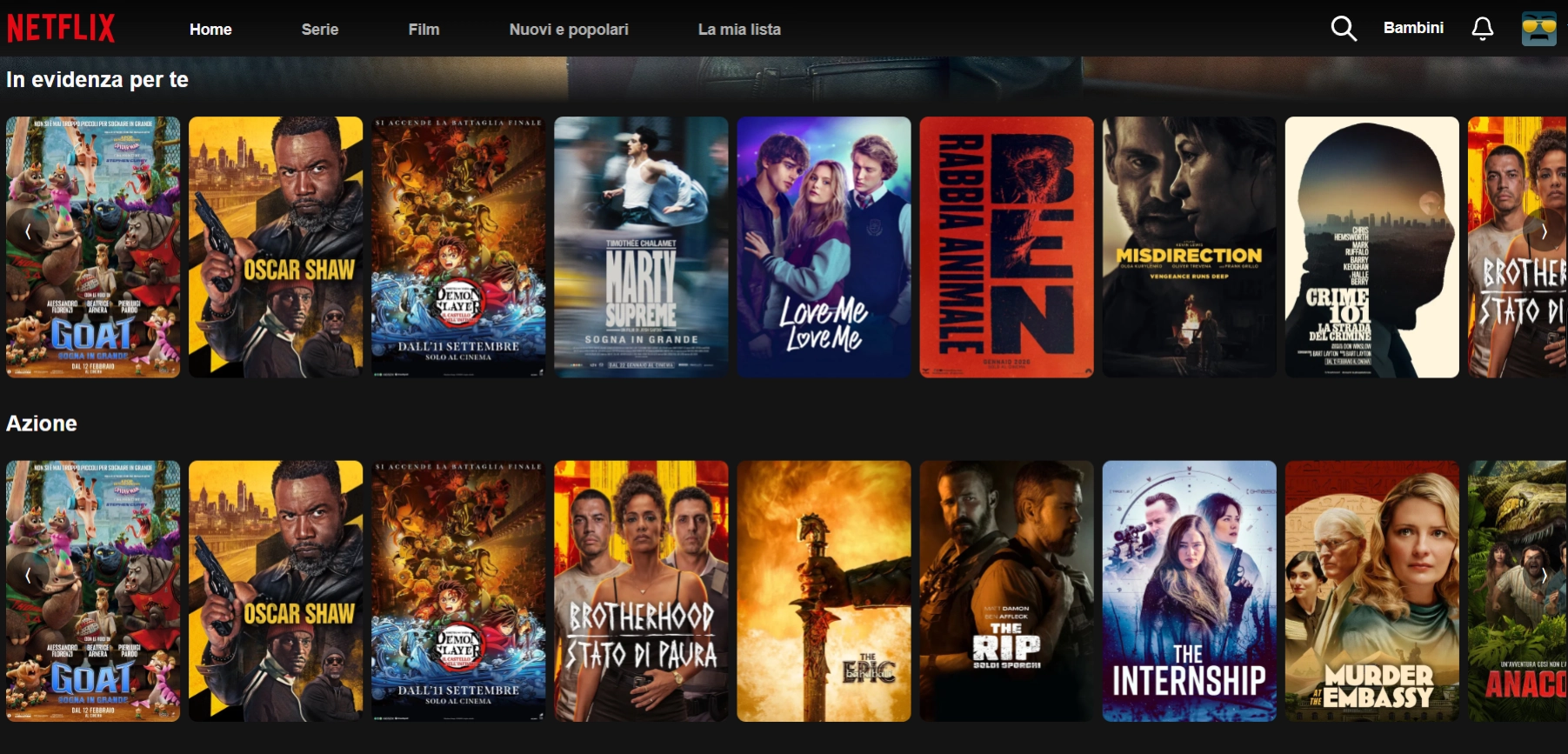
Netflix 2.0 is an advanced frontend engineering project centered on a precise problem: making an interface with thousands of titles, heavy video assets, and category navigation feel fluid and responsive. I chose React 18 with concurrent rendering to manage the component tree without visible blocking, paired with React Query for caching and TMDB API calls. The result is constant 60fps scrolling on every device, achieved through list virtualization and aggressive image lazy loading.
The most complex part was state management during category transitions. I implemented animated transitions that never sacrifice responsiveness: content previews preload as the user navigates, eliminating any perceivable wait. The search system is built to return real-time results while typing, with optimized debouncing and immediate visual feedback.
On the visual side, I worked on the "disappearing UI" aesthetic: an interface that steps back to make room for content. Dark design, calibrated gradients, and precise typography build a consistent cinematic atmosphere. Netflix 2.0 is not just a clone, but a proving ground where I validated frontend optimization techniques that I apply today in real client projects.
The project is deployed on Vercel with an automated deploy pipeline and Core Web Vitals monitored constantly in production, with fast initial load even on mobile connections thanks to per-route code splitting and intelligent poster image prefetching. Netflix 2.0 is now the case study I use most often to demonstrate to clients and recruiters how to build a data-intensive streaming interface that stays performant in production, from application state management to rendering virtualized lists at scale.
Netflix 2.0 achieves a Lighthouse Performance score of 100/100 on both desktop and mobile, validated by Google PageSpeed Insights in production. On desktop, First Contentful Paint is 0.3s, Largest Contentful Paint 0.3s, Total Blocking Time 0ms, and Cumulative Layout Shift 0. On mobile the scores remain excellent: FCP and LCP at 1.2s, TBT at 0ms, and CLS at 0. These results were achieved through per-route code splitting, image lazy loading, list virtualization, and bundle optimization with Vite.
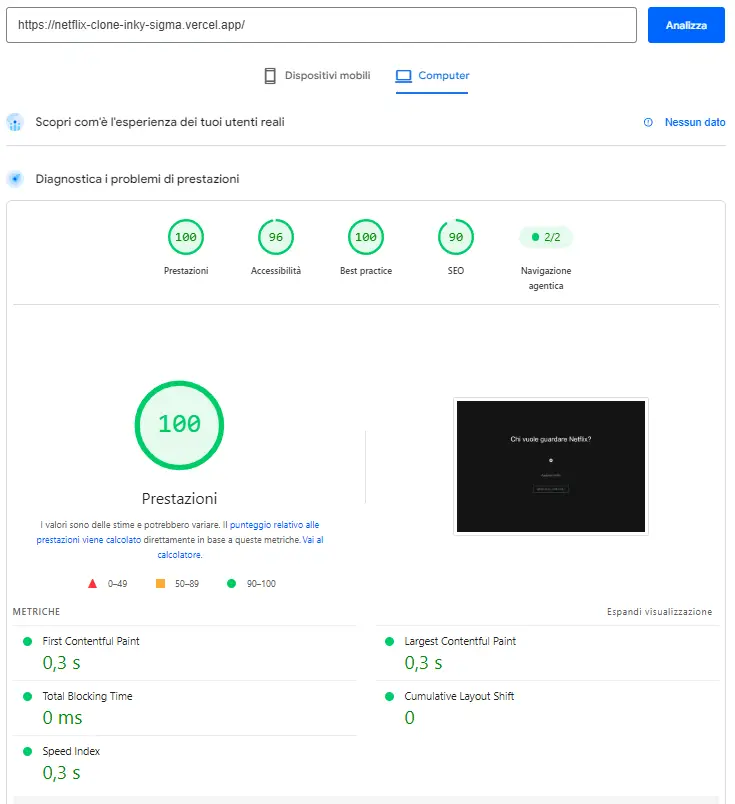 Desktop
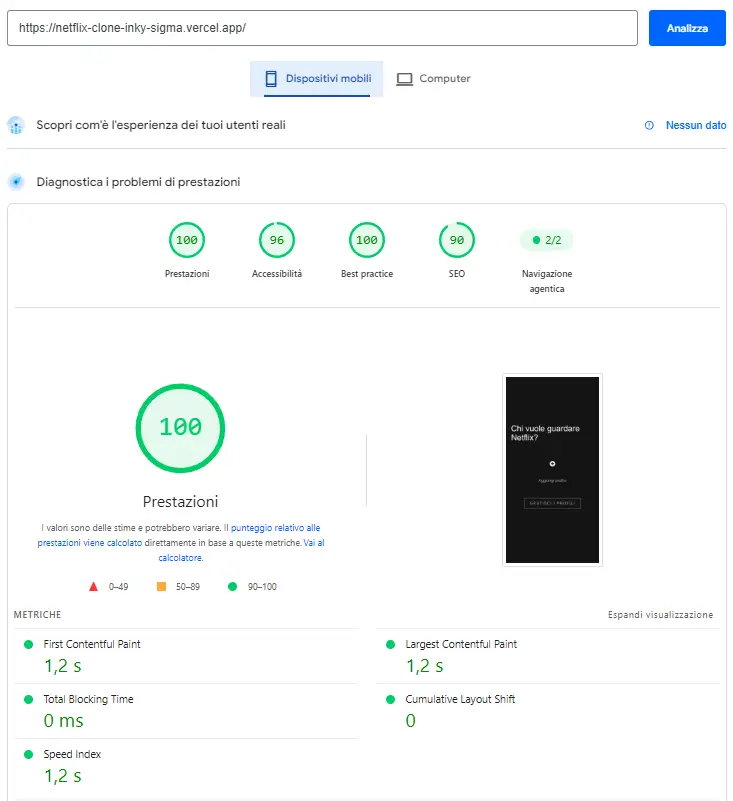 Mobile
FAQ
- Is Netflix 2.0 an official Netflix clone?
- No. It is a frontend engineering demo project that replicates the UI and interactions of a streaming service using public TMDB API data. It contains no copyright-protected video content and has no affiliation with Netflix Inc. The purpose is to demonstrate how to build a scalable, performant React interface on real data from a third-party API.
- What technologies were used to build Netflix 2.0?
- React 18 with concurrent rendering and Suspense to eliminate visible loading blocks, React Query for caching and TMDB API call management, Tailwind CSS for styling, Vite as the build tool, and Vercel for production deployment with an automated pipeline and Core Web Vitals monitoring.
- How is constant 60fps scrolling guaranteed with thousands of titles?
- Through three combined techniques: list virtualization (only the titles visible in the viewport are rendered in the DOM), aggressive poster image lazy loading with anticipatory preloading of upcoming rows, and React Query state management that eliminates unnecessary re-renders during category navigation. The result is an interface that maintains fluidity regardless of how many titles are loaded.
- Where does the film and TV show data come from?
- From the TMDB API (The Movie Database), a free, well-documented public source of metadata, posters, and information about films and TV series. The integration follows React Query caching best practices to minimize API calls and ensure smooth navigation even on slow connections.
- What does Netflix 2.0 demonstrate as a portfolio project for a React developer?
- It demonstrates the ability to handle real complexity: a data-intensive interface with layered application state, large-scale performance optimization, and external API integration. This is exactly the kind of technical challenge encountered in SaaS product development, enterprise dashboards, and high-traffic React applications. I use this project to show clients and recruiters how I approach performance and scalability problems in production contexts.